

In the event that your Tapo Robot Vacuum’s Water Pump is reporting errors, we suggest taking the following steps to troubleshoot and potentially resolve the issue.
Note: The Tapo RV10 Plus is being used in this case for demonstration purposes.
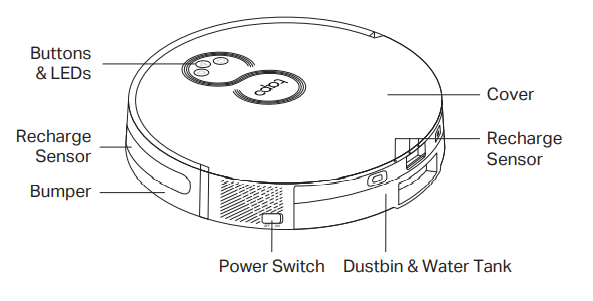
1. Remove the dustbin and water tank.
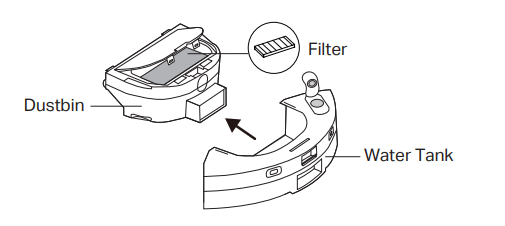
2. Clean the water tank.
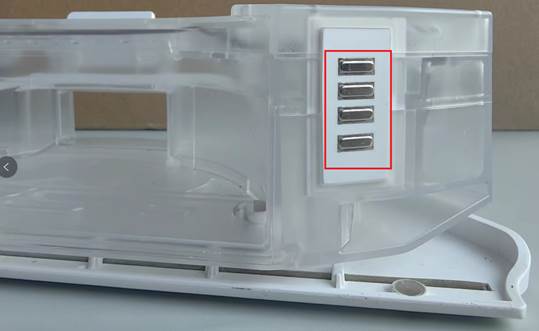
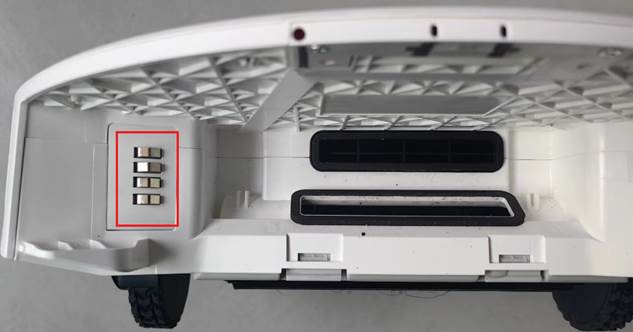
Using a clean, dry cloth, wipe the metal contacts on both the water tank and your Tapo Robot Vacuum before re-installing the dustbin and water tank. Wet or dirty contacts may cause water pump errors.
3. After cleaning the contacts, restart your Tapo Robot Vacuum.
If the problem persists, please Contact Support.